Ready to stop the hustle and start building assets? I’m opening the vault to my Digital Real Estate blueprints.
Get the raw truth behind my 12-blog engine, private updates from the road, and the "Signal" to help you Level Up. Success is a decision, Freedom is the Result. Ride my coattails, and Join the high Caliber life, so you don't get left behind — make yours today.
Online Systems I Use to Run My Life & Business as a Digital Nomad
This is a List of all the Online Systems I Use to Run My Life & Business as a Digital Nomadic Entrepreneur:
(Even While Working Remotely from an RV, Hotel, Airbnb, or on the Road!)
These are my remote working tips for how I stay organized while working remotely — whether I’m in an RV, a hotel, an Airbnb, or working from home. I’ve been working on the road as a digital nomad for years now, and no matter where I go, having the right online systems in place is what keeps my life and business running smoothly!
Whether you’re working remotely in a travel trailer, living the van life, or just managing your biz between different locations — staying organized digitally (aka online) is a must if you want to be productive while working remotely on the road.
So when I was asked:
“Brandi, how do you stay organized working remotely?”
…(especially after leaving the 9–5 grind and being completely out of the system!) they wanted to know:
what are your tips, systems, checklist you follow???
Here’s My Answer:
If you want to learn how to work remotely while traveling, it starts with knowing how to stay organized working from home — and that means creating online systems to run your life digitally.
So no matter if I’m:
Working from home
Living full-time in an RV (stationary or traveling)
On the road and running my business from a hotel or Airbnb
Or just living the digital nomad life from wherever the wifi flows…
…I rely on online systems to stay organized, productive, and profitable — from anywhere!
The Online Systems I Use to Run & Organize My Life & Business as a Digital Nomad
After 8+ years of working remotely, running an online business, and living a location-independent lifestyle, I’ve learned a thing or two about how to set up systems that help you make money online, stay focused, and keep your business running — even if you’re switching locations every week.
This is all about how I stay organizedonline and I’m able to access everything digitally, no matter where I am, in order to be productive and focused as a digital nomadic entrepreneur. How I go throughout my day as a non-corporate employee, non-nine-to-fiver, and as a business owner—being my own boss, making my own schedule, pretty much working and living from anywhere.
I Put My Life & Business Online
As a digital nomad, I’ve made the choice to live life online.
If you haven’t officially met me yet and you don’t know me and you’re like, “Who is this chick?” — I’m Blogging Brandi — an ex-corporate Kool-Aid drinker, born-to-be-blogger, creator, digital nomad, and RV-loving entrepreneur.
This is actually how I’m able to write this blog post here with you.
If you can relate to me, hit the like button below, subscribe to my newsletter, so you’re notified every time I publish something new!
From Corporate Systems to My Own Structure
I’ve had this happen a couple of times while on the phone. People have asked me things like:
“Hey, how do you stay organized, leave your nine-to-five, and get out of the system?”
Because when I quit my job in finance—if you don’t know, I don’t have a degree in filming—I have a degree in finance. I used to work for Bank of America Merrill Lynch, doing financial planning and investing for people.
Back then, everything was already set up for you:
You go to your 9-to-5.
They hand you “the systems”
Here’s who you call.
Here’s your checklist.
Here’s your training manual.
You go through the motions: kindergarten → college → marriage → house → 401K → retirement → finally RV life. 🙃
But I’m throwing all of that out the window, because now I’m going to teach you how I did it—starting when I was 29 years old.
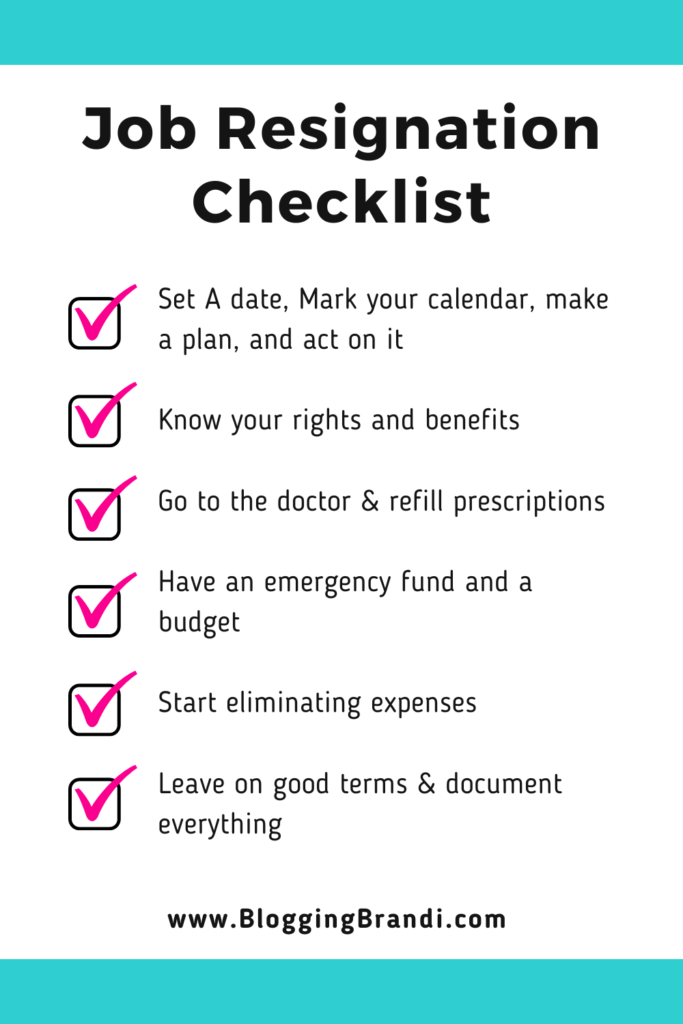
>> Get My Resignation Checklist— these are all the steps I took before, during, and after the process of firing my boss and quitting my corporate job (I prepared 6 months in advance for my departure), including the resignation letter I wrote 🫣
How I Got Started with RV Life and Working Remotely
I actually got my first RV at 29. I’ve been doing this for 8 years now. If you haven’t seen my story, be sure to view it next…
When I came out of corporate America, I had no idea what I was doing…
NO “systems” in place.
RV life wasn’t even on my radar.
I was just trying to figure out how to be my own boss…
Make money online…
On my own time…
On my own schedule…
So, I sat down and made a list of all the things I do to run my business remotely and stay organized while working from anywhere.
In my last post, I shared more about gear, essentials, and accessories I use to get set up in my RV or travel around with as my mobile office, working from home or while I roam traveling (everything goes in ONE bag)
Just like you get physical mail, eventually you’ll want to also have your physical mail, either a digital mailbox or some type of delivery service where you can get your mail delivered.
If you’re gonna be on the road traveling, you can get mail scanned to you. There are some services do that, or you can just go pick your mail up every once in a while. Trusted family or friends, might be an option.
There are all kinds of ways that you can get your mail while traveling or on the road — sometimes I have had packages delivered to hotels or RV Parks I’ve stayed at.
Like you get physical mail, you need digital mail too:
Set up a digital mailbox service to scan physical mail.
Or have family/friends collect it.
Some places you stay or visit hotels, RV parks, etc… allow delivery.
You can also get things like Amazon packages delivered to a Locker
You will have your physical mail, and then your digital mail. But, even as a digital nomad, you still have to have some type of domicile or residence where you’re gonna file your taxes and register your vehicles — things like that aka your mailing address.
I actually made a blog post for RVers on my RVersity website detailing all about getting mail on the road traveling, which you can read for more about this via my RV Living Guide: Mail & Address Essentials + Delivery Tips over there… 👀
📌 Files, Folders & Google Drive
Next up: file & folder organization.
The key to being a digital nomad is making sure everything is online to be able to access it from anywhere, whether you’re at home or traveling in your RV, or staying in a hotel. Airbnb, anywhere you want to be! You do not want to have files and folders sitting at home that you can’t find or get access to.
Portable hard drive to back up everything from my computer and on the cloud
I personally like Gmail, and I use GDrive (part of my Google Workspace) to create files and folders for receipts, passwords, accounting, finance, tax documents, and more…
For my business, I also have files and folders for my branding kit, content, clients, inventory items, business wins, social proof testimonials, my YouTube content, brainstorming and ideas, legal documents, receipts, budget spreadsheets, bank statements, and more…
Some folders I keep:
Receipts
Accounting & finance
Passwords
Branding kit
Content
Clients
Inventory
Testimonials
Budget spreadsheets
Legal docs
Social proof
Try to get all your mail delivered online electronically, all your bank statements and bills, eliminate paper in your life, try to scan everything you can online, and put it in these files and folders that you have access to them from anywhere, as well as keep backups on your portable hard drive in multiple places.
On your computer
On a portable hard drive
Online (in the cloud)
I have everything synchronized to my computer, in Google Drive, and in the cloud.
I back everything up every once in a while on my Portable External Hard Drive(and keep it in a protective case) to make sure that I don’t ever lose those files and that I can access them from anywhere (even if I’m offline without access to the internet) — I mentioned this in my gear and essentials list of MUST HAVE items for digital nomads!
Eliminate paper. Go paperless. Scan what you can. = Back everything up!
📌 Password Management
The next thing that you need to stay organized as a digital nomad, working remotely, is your passwords. So you need to have a password management system or a password manager.
My Google Browser and Apple Computer (as well as my phone) both have FREE password management programs. You’ve probably already seen them, like when you plug in a password signing in somewhere online and Google asks you Hey, do you wanna save this password?”
But I really like to have one central system like LastPass because they have a desktop version and they have an app version, and I will use both of those.
The desktop version is nice because it has everything laid out on your desktop, and it remembers all your passwords. It signs in for you. It’ll even change your passwords for you if you’d like it too. It’s encrypted.
And then, if you also download the app on your phone, then you can see the passwords over there and it’ll fill ’em in for you too.
You have to manage your passwords.
I use LastPass:
Desktop version
App version
Autofill + encryption
Even changes passwords for you
If you don’t use LastPass, create a password spreadsheet:
Website
Login ID
Password
Notes
Email used
Whether you get LastPass or not, you should download these passwords, put them in a spreadsheet, like a password spreadsheet, so that you have them even offline in case, say, LastPass is down or you can’t get to your phone, computer, or the internet!
You could print this out, have it in your files, and a copy on your computer desktop, too.
BTW… If you’re using LastPass, they have the ability for you to download all your passwords in a spreadsheet. I give my clients a spreadsheet
📌 Task Management Systems
The next thing that I use to stay organized online as a digital nomad is task management systems. You need to have a system for keeping up with your tasks all day. This can be done in many ways: on your phone via the reminders lists, or if you’re in Google, they have Google tasks.
One of my favorite systems to use, which is free if you just use the freemium version, is Asana. You can set up tasks, projects, reminders to dos, and you can also get Asana on a desktop or you can get Asana on your phone. You can also assign them to people or have teams.
Use something to track your tasks!
Options:
Your phone Task / Reminders
Google Tasks
Asana (my fave—free!)
You can:
Create projects
Set reminders
Assign tasks to your team
Check in from desktop or mobile
It’s easy to check in on these apps on your phone or on your desktop throughout the day, so you can check them off.
I use task management systems for myself and my team.
📌 Calendar Management
And the next thing I use to stay organized online as a nomadic entrepreneur and digital nomad is a calendar! You have to have a calendar you can access from anywhere.
I’m very protective of my calendar.
No willy-nilly calls over here.
Why? Because I:
Travel between time zones
Use calendar blocking
Need structure to stay productive
With calendar management, I do this both digitally and physically (I mentioned the paper planner that I use,my mobile office must-haves list — in a prior post)
I use digital calendars for my calls and meetings, but also for all the other “things” that I have to do: dinners, birthdays, cancel memberships, trips planned, vet appointments, etc…
Calendar management systems or digital calendars I’ve used range from: Google Calendars, it can be your phone calendar on your Apple or Android device. Also, I like to use Calendly for free.
They also have a paid version that has more features, but you can start out for free with almost all these things that I’m telling you about. It helps me manage my calendar. So if people want to book calls with me, they can book through Calendly. It helps me manage those calls with my calendar — it syncs to my Google calendar, which then syncs to my Apple calendar on my computer and my mobile phone. So they all link together.
My calendar stack:
Google Calendar
Apple Calendar
Calendly (for booking calls)
Calendly links with:
My calendar(s)
Zoom
and vice versa…
So everything syncs up. Easy for others to schedule with me.
Calendly is also connected to my Zoom account to help me stay organized online. Instead of just having people texting, emailing, and calling me to make appointments, I try to get everybody to book a call with me on my calendar. So I know when I go into my online systems — here’s where all my calls/meetings/events are!
📌 Zoom for Calls & Meetings
Zoom is essential for calls and meetings.
You can:
Start with the free 40-minute plan
Upgrade for longer meetings & paid features
I meet with clients every week on Zoom. Calendly books → Zoom links → Calendar reminders. It all connects.
I connect my Calendly to my Zoom and then it goes to my Google calendar, and then my phone, and everywhere else — so it all connects.
As a digital nomad, my online life connects. It allows me to work remotely, so it doesn’t matter what time zone I’m in. When I open up my watch or look at my phone, I know exactly what time I need to be on the phone.
Sometimes I do have to check the time zone again lol, but I typically, if all my systems are set up correctly, I know what time I need to be on the phone, where I need to be, and then I can plan my day around those things.
📌 Contact Management & CRM
Managing contacts on the go = non-negotiable.
How do you manage your contacts on the go? Running an online business being a digital nomad, you have to do that online — the days of paper business cards and a Rolodex are over.
I know you can have contacts in your phone, but eventually, as a digital nomad and a business owner, you want to have a CRM, a client relationship management system. When I was doing financial planning and investing, I helped set up a CRM client database. In fact, I was so good at automating all the calls, birthdays, meetings, etc, it got me laid off = aka fired! 😂
We did it in Salesforce in my corporate job, but you can actually do it for free in HubSpot CRM or use Google Contacts. You can also do this on your phone and or even in a Google spreadsheet.
Instead, I use:
HubSpot CRM (free)
Google Contacts
Google Sheets (backup/export list)
You’ll want to keep all your information for your contacts, customers, leads, potential customers, name, phone number, emails, social media handles, website, company, and any other notes.
So outside of my email management system, which I use for when people sign up for my email list (which is like a whole other video), these go into a contact management system.
I manage these by putting notes in there, and it’s connected to my email. So when I send an email, it actually tags the system and keeps a track of those emails in that system. This way, when I go back to talk to that person, I have notes in the system and I can say, Oh, I had a call with this person on this date, or we talked about this, or here’s the details about this person.
A CRM tracks:
Names
Emails
Phone numbers
Social handles
Notes from meetings
Conversations history
No matter where you store your contacts, you do want to make sure that you download them every once in a while, export them into some type of spreadsheet so that you have them somewhere else, not just like in some other platform that you don’t own.
Let me tell you WHY…
For instance, HubSpot, if you don’t sign into it for a really long time, then they give you a notification and they say: Hey, we’re gonna delete all your stuff if you don’t sign in soon! — And, you don’t want that to happen.
Again, you don’t own social media, or YouTube, but you do own things like your email list and your contacts, which are the lifeblood of your online life and business, especially as a digital nomad (or nomadic entrepreneur like me)!
You don’t own social media. — But you do own your email list and contacts.
📌 Digital Banking & Budgeting
I didn’t include this in the main list, but it’s key:
Go digital with your money.
I think it is important to go digital financially, so I have also found ways to to stay organized through my budgeting and banking.
I do all of my banking online, all my bills and bank statements, any kind of tax documents, all my financials. I try to say, send it to me digitally so that I can get everything online.
So whether I’m working from home or while I roam in my RV, signing financial documents, I never have to go into a bank or do anything physically. I can usually do everything digitally, either on my phone or computer.
I’m sharing the exact online systems I use to stay organized as a digital nomad, whether I’m:
RV living
Traveling the country
Working from an Airbnb
Or just staying put at home
If you’re considering working and traveling full-time, or even just want to streamline your life and biz while working remotely — these remote work systems and organization tips are for you!
If you like these online organization tips and want to learn more about how to work remotely and live a digital nomad lifestyle, make sure to subscribe to my channel!
I’ve got more videos coming with:
Systems
Tools
Tips
Resources
…I’ve learned while working remotely full time, traveling the country, and running a successful business from anywhere.
If you enjoyed this video on how I stay organized using online systems as a digital nomad, please:
Hit that like button
Drop a comment and let me know your favorite online tool or system for staying organized!
Want My Full Checklist? Free Masterclass? Let’s Chat.
If you liked this post, hit the like button below. Sharing is caring—send it to someone who needs to hear this.
💬 Drop a comment: Which of these tips do you already use? What do you still need to set up? I love reading your comments (they’re my love language!).
And don’t forget—subscribe to my channel and turn on notifications so you never miss a new video.
I love you. I’ll see you in the next one. Thanks for reading and watching!
ABOUT ME:
If we haven’t officially met Hi, I’m Blogging Brandi, an EX-Corporate Kool-Aid Drinker, born to be blogger, Female Entrepreneur, and Digital Nomad who LOVES RV Living, since it keeps me close to Nature! Although you can catch me from time to time on an airplane, in a hotel, Airbnb, as I can WORK FROM ANYWHERE, not just my RV. I’m also an all-natural, introverted, God Fearing, Rescue Dog Mom, but most importantly, a Writer and Creator! Plus, you might not know I have a Finance Degree and am licensed in Master Cosmetology! I believe you can have many passions, create multiple streams of income, and don’t have to conform to the norm!
Affiliate Disclaimer Note that blog posts and pages throughout this website all contain affiliate links that allow you to find the items mentioned and support the website at no cost to you. While this website may earn minimal sums when the viewer uses the links, the viewer is in no way obligated to use these links. Thank you for your support!






Add A Comment