

My Mobile Office Essentials: Must-Haves For Digital Nomads (that fit in a bag) 🎒
Wondering how to become a digital nomad? The first step to becoming a digital nomad is having all the right mobile office essentials so that you can work from home or while you roam! So, if you need a Work From Home Setup That Fits In Your Bag, I compiled a list of all my digital nomad must have essentials, accessories, and Tech Gear For Working Remotely. Whether I’m working from the RV doing the van life thing, in a hotel, an Airbnb, or ANYWHERE I want to work while traveling, I can make money from anywhere, as long as I have these items!
These are the top tools to have a comfortable Mobile Workstation as a digital nomad, stay organized, and be productive in between all those frequently changing locations while working remotely. This is the Mobile Office Setup that allows me to work on the road comfortably while traveling, without sacrificing convenience. The best part is that all my digital nomad gear fits in a bag!
Keep on scrolling and let’s take a look at my ULTIMATE Remote Work Setup While Traveling and working as a digital nomad… 👇

🎬 BONUS: I’m giving you a tour of my Digital Nomad Office Setup and showing you how I work remotely while Stationary RV Living Full Time in a travel trailer at the RV Park using all of these items mentioned – A bit of a different kind of video, enjoy watching it down below!
🎒 Digital Nomad Mobile Office Essentials: How I Run My Business On the Road
If you want to be a digital nomad, work from home remotely, or make money online from anywhere, then you need to have the right gear, essentials, and accessories.
That’s why today I’m sharing with you how I’ve been able to run my business on the road for the last eight years as a digital nomad—with the right essentials, must-haves, and gear.
💻 My Digital Nomad Office Setup
I’m gonna show you my office setup that I use while I’m stationary working or while traveling—in the RV, hotel hopping, or maybe even an Airbnb!
If you haven’t seen the tour of that, I gave you a tour of my RVs earlier. But there are a ton of gear, essentials, and must-haves that I use to run my business on the road—whether I’m:
- in the RV stationary (travel trailer)
- Exploring van life on the road
- at the condo
- or in an Airbnb, hotel… whatever it may be
You have to have some essentials to get set up and started in your digital nomadic life! Because if you don’t have these things, it’s gonna make it hard to have this life of freedom—and to work from home or while you roam!
>> [WATCH] Full Time STATIONARY RV Living TOUR (Behind The Scenes As A Female Digital Nomad)
🎒 Think of This As Your Digital Nomad Syllabus
Think about it as if you were going to school, and you needed that syllabus from your teacher at the beginning. And they’re saying:
“Oh, here’s the checklist of all the things that you need before you can come to class: glue and tape and paper…”
That’s what I’m gonna give you today.

👋 Who Am I?
If we haven’t officially met, I’m Blogging Brandi from RVersity—my university for RVs—where I teach digital nomads how to ditch what I call my ex-corporate Kool-Aid drinking job and dive into the non-traditional workforce or RV life.
I teach you how to follow in my footsteps and how I got started—how I did this whole digital nomad RV living “thing.”
So if you haven’t seen my story, you can also check that out—of course, after this is over 😉

>> [MY STORY] – How I Became a Digital Nomad: Leaving Corporate America to RV & Build an Online Business…
🐶 PS: Meet the Crew!
ICYMI (In Case You Missed It) — along my travels, I’ve rescued 5 dogs and 1 cat that all live with me!

PS My Cat and Dogs have their own blogs you can follow @BirdiesDoghouse + @CattitudeChaos to keep up with all the BTS of their EXTRAVAGANT life, plus get all their essentials, tips, tools and more…
TBH, there is a little more involved when you’re juggling a bunch of furry paws along as a digital nomad trying to run a business!
📋 The Checklist I Give All My Students
There are several things that I’m gonna talk about and include—and I just wanted to tell you—this is all in a checklist.
The same checklist I give all my peeps when they come in to work with me inside my program.
I say:
“Hey, if you don’t have these things, it’s gonna be really hard for you to work remotely and start this life on wheels.”
But first… let me tell you why you need these things.
✅ Computer
My Apple computer is obviously the first essential item on my list. In the past, I’ve used a desktop, but I prefer a laptop because I can pretty much take it anywhere. It’s a 13-inch MacBook Pro—the newer model with an M2 chip (maybe the 2022 edition). I don’t know all the exact specs.
Speaking of which, if you feel like your computer is outdated and you’re thinking, “Oh my gosh, I don’t know how I’m going to do this whole digital nomad thing or work remotely…”—having a computer that’s up to date is essential. And not just “up to date”—my last computer was at the end of its life. It couldn’t even get software updates anymore. It was at least 10 years old!
One thing I will say: investing in an Apple or MacBook is pricey, but it’s well worth it. This is the machine I use to edit all my videos, make business decisions, hop on Zoom calls, and handle all the other fun stuff.
Either way, having a laptop is the first must-have.

✅ Computer Hard Case With Stand
Another thing I use—and love—is my computer hard case with a built-in stand. When I’m not working at a table or using my newer setup, this has been a go-to solution.
The case has little legs on the bottom (you might be able to see them), and they help prop up the computer. It comes with both a front and back hard shell, so it protects the laptop while also making it more functional for remote work.
These hard shell cases are available for different laptop models, and I really like that it allows my computer to stand up while I work. Plus, it helps prevent overheating, especially if I’m working for long periods of time in one spot.
>> Check out this Computer Hard Case (With Stand / Legs)

✅ Computer Mouse
Another thing I think is super essential—but that most people surprisingly don’t have—is a mouse. I’ve noticed this a lot, whether it’s someone interning with me or a colleague I’m working with. It seems so simple, but it makes a big difference.
I use a Magic Mouse, which is a bit more expensive and designed to go with an Apple laptop. So, if you have a MacBook and you don’t have a Magic Mouse—oh my gosh, you need to get one!
That said, it doesn’t really matter whether you have an Apple Magic Mouse or just any regular mouse. The point is, it’s way easier to get work done when you have a mouse. Trying to do everything with just the trackpad and your fingers? It’s tough and inefficient.
You can grab a mouse on Amazon or anywhere really—it doesn’t have to be fancy. Just having one will make your remote work life much easier.
>> Get my Rechargeable Mouse or (Apple Magic Mouse)

✅ Mouse Case
I also have a case for my mouse—yes, my mouse has its own case! It’s just a small hard case that I use to store and protect it while I’m traveling. You just unzip it, place the mouse inside, and zip it back up. Simple, but super helpful for keeping it safe on the go.
>> Get my Mouse Case (for Travel)
✅ Computer Sleeve Protector and Storage Case
Being a digital nomad, I almost always have my laptop with me—especially when I’m traveling! That’s why I make sure to keep it protected while moving from place to place with a computer sleeve/storage case.
I actually bought a sleeve that’s one size bigger than I needed so I could fit more items in the pockets. YES—it not only stores your laptop for travel, but it also has pockets for your charging cable, mouse, and a few other essentials!
I also love that it has a handle and zippers for secure carrying. It’s perfect for grab-and-go moments.
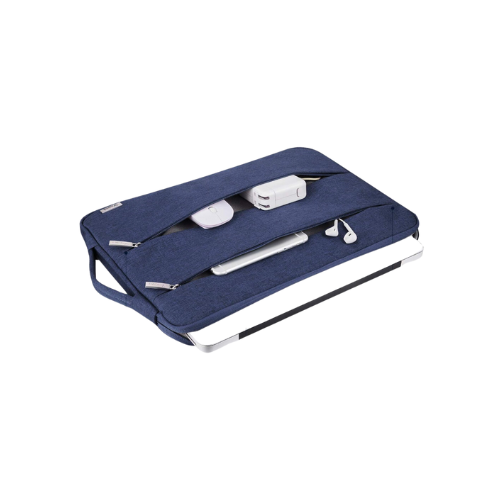
I got this Zippered Computer Sleeve Protector With Storage Pockets on Amazon!
✅ Portable External Hard Drive (with protective case)
Another essential item I have is my portable External hard drive, it’s where I store my data when it’s not on my computer or in the cloud.
It’s basically mini storage—like a tiny external vault for all your files. This one is by Seagate, and it comes with a little plug. I also keep it in a protective case to help prevent damage because it’s really important not to drop it. I’ve had other brands before, but Seagate has worked well for me.
Pretty much all my data is stored on this drive—pictures, videos, and files I’ve uploaded to the cloud or keep on my computer. I also store things here that might not be on my laptop or in the cloud, just to have an extra backup.

I’ve had several of these over the years, and I firmly believe your files should be backed up in multiple places:
- On your computer
- On a portable hard drive
- Online (in the cloud)
When you’re a digital nomad or working remotely, you must have access to your files—anytime, anywhere. And if you can’t get online, your hard drive may save the day (or vice versa).
I started out with a two-terabyte drive, and I think this one’s five terabytes—but I’m not 100% sure.

>> Get my Portable External Hard Drive (and protective storage Case)
✅ Mobile Phone
Let’s talk mobile phones. As a business owner, I have two mobile phones. I do have an Apple iPhone and an Android that I can plug in to use, but I definitely prefer my Apple—iPhone all the way!
I can do a lot with my iPhone. In fact, when I’m not using my laptop, I pretty much run my entire business from my phone. It has all the apps I need—though that’s a whole other blog post and video on its own.
💡 Pro tip: I record almost all of my YouTube videos with my iPhone! Hit the subscribe button so you’re notified when I publish that one! — I’ll be sharing more about how I stay organized, stay productive, etc…
But first things first—before you can get fully set up to be a digital nomad, you need to make sure you’ve got all the right tools in place.

✅ Chargers & Cables
I obviously need phone chargers, computer chargers, and cables—all the essentials to keep everything powered up.
One thing I’ve found that works really well for me is using multi-chargers. These let me charge multiple devices at the same time, which is super convenient when I’m on the go.
I will say, with some brands, one of the iPhone charging ports may or may not work consistently—but the multi-charger I use comes with two iPhone ports and also includes micro or mini USB ports for other devices.
I usually order these on Amazon, and they often come in two-packs. I keep them everywhere:
- In the car
- In my bag
- In every RV
- In the van (for van life!)
- At the condo
Basically, no matter where I am, I’ve got a charger close by. Can’t live that digital nomad life without them!

>> Get these Multi-Charging Cables on Amazon!
✅ Charging Block for Wall
Another thing I always keep with me is these little charging blocks. You know, sometimes you get to a place and they don’t have USB ports—like the ones we have in the RV or in the car—so you need a backup option.
That’s why I keep a few of these charging blocks (or just regular USB wall adapters). They’re not always branded, but they get the job done.
Having a couple of these on hand ensures I can charge my devices anywhere—even when the outlets are basic and don’t have built-in USB ports.

Get these Charging Blocks for Walls online!
✅ USB-C External Plug Adapter
This next item isn’t exactly a charger—it’s a USB-C external plug or adapter. Newer Apple laptops (and even some Android devices and HPs) don’t come with all the traditional ports that older computers used to have. So, instead of having built-in HDMI, SD card slots, or regular USB ports, you need a separate adapter.
I have to plug this into my computer in order to connect things like:
- HDMI cables
- SD cards
- USB-C power cords
- Ethernet cables
- Regular USB devices
With this one little device, I can charge my phone, connect my Apple Watch, use my portable hard drive, and more. Without it, I wouldn’t be able to plug in or power many of the things I use daily.
Whether or not you need this will depend on your computer model—but if you have a newer laptop, this kind of adapter is a must-have!
This is also important to have because many vehicles and other devices are starting to use the USB-C plug to connect devices, and you still might need this adapter.
>> Get this USB-C Adapter Plug Adapter

✅ Camera / Phone Mount
Another must-have for digital nomads — is my camera/phone stand. If you want to be a digital nomad, this is one of those tools that makes content creation and video calls so much easier.
There are lots of different kinds out there, but mine is a stand that your phone clips into. It can tilt and wobble from side to side, move up and down, and even rotate if you need to film or record sideways. You can also adjust the height to make it stand exactly how you need it.
That’s what I love about this stand—it’s super flexible. And while I’m not tied to any specific brand, I like ordering from Amazon because no matter where I am—whether I’m in the van, across the country, or just forgot something—I can usually get whatever I need delivered right to me.
>> Get this Camera / Phone Mount
✅ Internet & WiFi
The next thing I was thinking about — which I do actually have here — is the internet.
Can you see that device back there? That is the internet. <laugh>
We’ve tried different forms of the internet over the years. Right now, we’re using T-Mobile Home Internet, and it has been a lifesaver for us.
Over time, I’ve also used digital nomad internet options, tethering, and all kinds of other setups. I actually made a whole video on my RVersity YouTube channel about how I get set up for the internet, where to find free wifi on the road, plus safety and security tips for connecting.
The internet is absolutely essential as a digital nomad. But honestly, it’s a much bigger topic than I can cover in this short video. I’ll just say this — you want to have WiFi and internet access that’s as close to unlimited as possible.
You do not want to be limited when it comes to your ability to connect online.
▶️ [WATCH] My RV Internet Setup I Use RV Living To Stay Connected On The Road

✅ Notebooks (Because I Still Love to Write!)
It’s kind of funny—I call myself a digital nomad, but honestly, I love writing by hand.
Over the years, I’ve gone through plenty of these, but I always keep a good old-fashioned college-ruled notebook with me. I just write, write, write in them! You can flip through and see I’ve filled them with all kinds of notes, ideas, plans—you name it.
I prefer college-ruled paper because the lines are skinnier, so you can fit more writing on each page. I usually grab these at Walmart or order them online. This particular one is a five-subject notebook, and I think it has around 200 pages. Sometimes I get the smaller ones with 100 pages—it just depends.
I love to write things out first, usually before I type or upload them anywhere online. It’s part of my creative process, and it helps me stay focused and organized.

>> Check out these College Rule Notebooks I like to use.
✅ PENS, PENCILS, & HIGHLIGHTERS
Paper is one thing, and then of course, pens, pencils, and highlighters. I like to have different colors (just the basics): blue, red, and black. I’m not trying to get super creative with pink, greens, or any other fancy colors. Some people do, if that’s your thing… do you boo AS LONG AS you stay productive! BUT, Don’t sabotage your success by trying to look “pretty all the time”
But I do like to have highlighters and things too. And I keep them in my bag.
BTW, my boyfriend bought me this “Curva Pen” that is supposed to be for writers like me!

Speaking of writing, I do a lot of things online digitally. I shared a video about how I do things like my planner and calendars, and all the systems that help me run my life and business digitally.
>> READ: The Online Systems I Use to Run & Organize My Life & Business as a Digital Nomad
✅ Planner / Calendar
I also have a planner/calendar that I use—and I love it. It actually comes with these little sticky notes, which are super handy!
This planner includes monthly calendars, and one of my favorite features is that it has space for daily notes and time slots for appointments. It’s laid out Monday through Sunday, and it gives me a place to organize everything from meetings to personal tasks.
I like having something physical that I can look at to track my schedule. Of course, I also use digital calendars (which I’ll talk about in an upcoming video!), but having a planner helps keep me grounded.
These are the little things that help me stay sane. Sometimes I can’t get online, or I’m not near my computer, or I just need to jot down an idea quickly—so it’s great to have something right there in front of me.

>> Check out this Planner / Calendar
✅ Headphones
Headphones — I have my Apple headphones.
The reason I have these Apple AirPods is that they’re really easy and compact. They fit easily in my bag, I can take them around with me, and they’re super convenient.
Before I used these, though, I had a set of noise-canceling headphones that took up a lot more space. I liked them better because they fit my ears better. With the AirPods, I bought some little add-on pieces that go on them so they fit in your ears better.
The noise-canceling headphones (by Sony) block out more sound than the AirPods. They do fold flat and aren’t as big, but to me, they still take up more space than a little set of AirPods I could throw in my purse and always have with me.
Plus, the noise-canceling headphones have a microphone on them — and so do the AirPods — but the headphones come in a little pouch I can take around with me. So, I either have my noise-canceling headphones or my AirPods, depending on what I need that day.
>> Get My Headphones (or AirPods)

✅ Ear Plugs
If you know me, you know I’m an introvert — and I really like to work in a quiet space.
If I can’t find a quiet space, my next go-to is to have earplugs.
I recently found a brand I really like after trying different kinds — they’re called Loop Quiet earplugs. They have different versions depending on how much you want to hear.
They come in a little pouch, along with a small container (or device, I guess you’d call it) that holds them. The earplugs themselves are just these tiny little pieces that you twist into your ears.
Loop offers different colors and sizes — extra small, small, medium, and large. I think the medium size comes on them by default. You can choose colors that blend in (so people hardly notice) or colors that stand out.
These earplugs help tone down a lot of surrounding noise, which is perfect if I’m somewhere busy and trying to get work done. Their slogan is “Live life at your volume” — and that’s exactly what they let me do. Especially when I’m living stationary working remotely at the “RV Park” aka the Trailer Park, which is EXTREMELY LOUD and NOISY 24/7 nowadays… 😭
I ordered my Loop Quiet Ear Plugs on Amazon!
✅ Lap Pad Desk
Another thing I’ve used—and still keep around—is my lap pad (or portable lap desk). I’ve had it for a while, and while it’s a little beat up now, I still use it when I need it.
It’s super helpful if I’m somewhere like an airport or any place where I don’t have access to a desk or flat surface. If I need to use my mouse or get some work done comfortably, this lap pad comes in handy.
This one is by ADATA, but honestly, it’s not about the brand. You can find similar ones on Amazon. What I love about it is that it works whether you’re left-handed or right-handed—you can use either side for your mouse. The other side holds your laptop, making it a great solution for remote work in tight or awkward spaces.
It’s flat, simple, and well-used (yes, I’ve even dropped it!). But it does the job—and sometimes, that’s all you need.

>> Get this Lap Pad online!
✅ Clicker
The only other thing I can think of is this little clicker—and I love it! This clicker helps me control my camera or phone remotely. For example, if I clicked it right now, it would turn off this video. I use it to start and stop recordings or take pictures without having to stand right next to my device.
It’s super handy, especially when filming content or snapping photos solo.

>> Check out this Clicker
✅ Apple Watch
One more thing I probably should’ve listed earlier is my Apple Watch.
Now that I have it, I don’t necessarily need to use my clicker anymore to start or stop videos—but I still keep the clicker around just in case. The Apple Watch adds an extra layer of convenience, especially when I’m filming or working, checking messages, etc… on the go or away from my phone.
Plus, I use it to check the time, get notifications, answer calls, tasks, and reminders. I LOVE my Apple Watch!

✅ Carry Case / Bag
The last thing on my list of digital nomad office essentials is the bag that I keep all of this in — my Vera Bradley carry case.
This is just a travel bag, and I love it because it has a lot of pockets in it. They have different versions, but mine has about six pockets all the way around, which is why I really like it.
There are even little secret pockets! It’s just a really nice bag where I can throw everything in and go.
When I’m done here — whether I’m getting in the car, heading to the condo, hopping in the van, or on a plane — I throw everything I just showed you (minus the desk) into this bag, zip it up, and take off.

>> Check out this Carry Case / Bag (Vera Bradley Tote)
🎬 Watch the video
If you can relate, please don’t hesitate to WATCH this video, hit that like button, and drop a comment below to let me know! And, of course, be sure to SUBSCRIBE to My YouTube Channel HERE!
>> WATCH: My Remote Work Setup & Must Haves for Digital Nomads — that fits in a bag!
Even though this is, again, my stationary RV living setup that I wanted to show you, I promise—as long as you have the things that I’m gonna share with you—you can make money online from anywhere.
Digital Nomad “Office” MUST HAVES:
- Laptop Computer (Apple MacBook Pro)
- Rechargeable Mouse or (Apple Magic Mouse)
- Mouse Case (for Travel)
- Portable External Hard Drive (and Case)
- Mobile Phone(s)
- Chargers & Cables
- USB-C Adapter Plug (for Mac Book)
- Camera / Phone Mount
- Internet / Wifi
- College Rule Notebooks
- Pens, Pencils, Highlighters
- Planner / Calendar
- Headphones (or AirPods)
- Ear Plugs
- Lap Pad (or Stand Up Desk if stationary at the RV Park)
- Computer Hard Case (With Stand / Legs)
- Clicker
- Apple Watch – Smart Watch
- Carry Case / Bag (Vera Bradley Tote)
That is my mobile office setup and digital nomad essentials must-haves for working from home or while I roam because they all fit in a bag to take on the go! Comment below if you have any of these things or if you have something you use I should add to my list!
Now, you know the digital nomad essentials, gear, accessories, and must-haves I use for my mobile office setup. These items are how I’m able to run my life and business on the road, operating from anywhere, whether I’m in my RV stationary, exploring Van Life, or at the condo, Airbnb, hotels, etc…
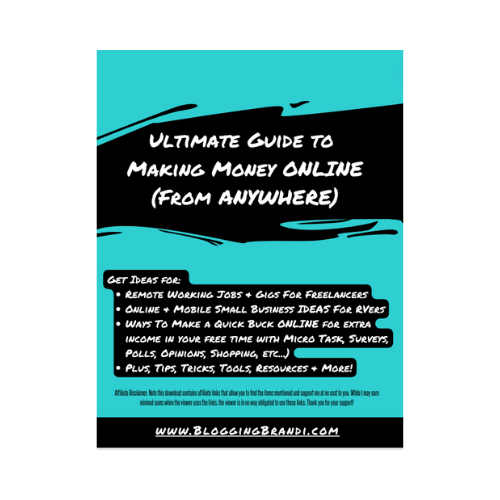
Don’t worry. I’ve put all these items into a checklist, plus more…
ABOUT ME:
I’m Blogging Brandi. If you haven’t seen my story, you can find that in the description below, plus meet me and learn all about me and all the goodies. If this is resonating with you, again, hit the like button below, subscribe, and turn on notifications, so you’ll be notified each and every time I publish a new video. I’m so excited that I finally got to share this with you. I can’t wait to share the next episode. Thanks for reading/watching, and I’ll see you in the next one.
Don’t Miss A Thing…
🗞️ Sign Up To Receive My Email Newsletter!
💃 Follow Me @BloggingBrandi via Facebook, Instagram, and Pinterest.
🎥 Also, don’t forget to Subscribe on YouTube!
Mentioned & Related
- Online Systems I Use to Run My Life & Business as a Digital Nomad
- VIDEO – Full Time STATIONARY RV Living TOUR BTS Female Digital Nomad (Travel Trailer)
- Full Time STATIONARY RV LIVING TOUR! (MOTORHOME)
- My RV INTERNET SET UP for Full Time RV Living
- RVersity Playlist
- How To Be A Female Digital Nomad Entrepreneur – Playlist
- 11 Productivity Tips For Digital Nomads Working Remotely
- How I Avoid Entrepreneur Burnout: Stay Motivated, Focused & Get Things Done!
- How I Eliminate Distractions, Stay Focused & Productive (as a Nomadic Entrepreneur)
- How I Motivate Myself To Get Things Done (as a Digital Nomad & Entrepreneur)
- From Chaos to Clarity: How I Overcame Overwhelm in Life & Business
- [MY STORY] – How I Became a Digital Nomad: Leaving Corporate America to RV & Build an Online Business



Add A Comment